Android preview · free

One reader for the open social web.

Bluesky, Mastodon, Pixelfed, Lemmy, RSS and any AT Protocol app, mixed into channels you design. Skylab hosts nothing: your channels, sign-ins and AI keys never leave your phone.

No account needed to read Bring your own AI Android 7+ · any CPU 102 MB sideload
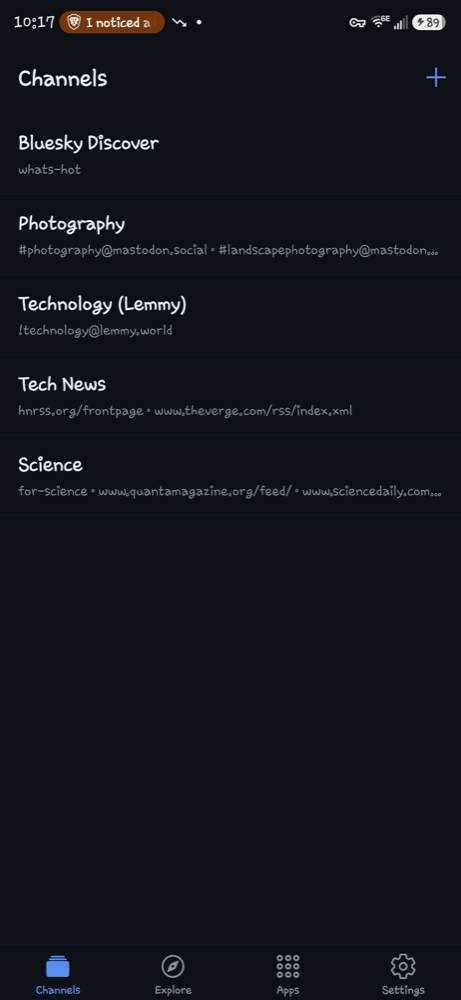
Skylab home screen: a list of channels — Bluesky Discover, Photography, Technology (Lemmy), Tech News — with a tab bar for Channels, Explore, Apps and Settings
CHANNEL · CAMERAS#[email protected] · r/photography · a Bluesky feed · PetaPixel RSS
TL;DRSummarized by your model. Nothing leaves the phone until you choose one.
Bluesky Mastodon Pixelfed Lemmy RSS & Atom Reddit (RSS) Any AT Protocol app $Cashtags
Why Skylab

Your feeds, your mix, your rules.

Most apps show you one network the way that network wants. Skylab reads them all and shows them the way you want.

Channels, not timelines

A channel is any mix of sources: a Bluesky feed plus a Lemmy community plus three RSS sites plus a fediverse hashtag. Name it, filter it, done.

Three ways to look

List for reading, Gallery for photos, Magazine for news. Skylab picks the right one from the content; override it per channel any time.

AI you control

TL;DR any thread with your own API key, a model running on your own computer, or Skylab's hosted beta. Default: none.

Explore the whole network

Curated topics, Bluesky people and feeds, what's trending, and new AT Protocol apps discovered as they appear. Add anything as a channel.

Sensitive content stays hidden

Bluesky labels, Mastodon sensitive flags and Lemmy NSFW are respected and off by default. Turn them on per channel if you want.

Paste anything

[email protected] · #[email protected] · r/selfhosted · $TSLA · a profile URL · a site with RSS. Skylab works out the rest.

Views

Same channel. Three personalities.

Switch instantly; nothing reloads. The choice is remembered per channel.

List · for reading

Gallery · for photos

Magazine · for news

AI summaries

Pick who runs your AI.

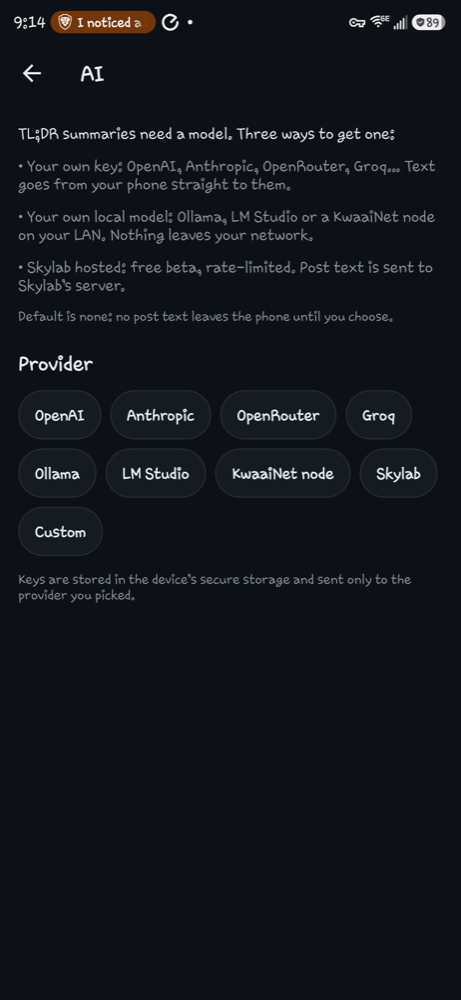
Long thread? Tap TL;DR and get three to five neutral bullets. Where the text goes is your decision, made once in Settings → AI.

1

Your own key

OpenAI, Anthropic, OpenRouter, Groq or any OpenAI-compatible API. The phone talks to them directly; the key lives in Android's secure storage.

2

Your own computer

Ollama, LM Studio or a KwaaiNet node on your Wi-Fi. Nothing leaves your network. One tap presets, a "Fetch models" button, and a connection test.

3

Skylab hosted

No setup. Free beta, rate-limited, clearly labeled. Only the public thread text is sent, and it is not stored.

Default is none. Until you choose, no post text leaves the phone.

Skylab AI settings screen listing the three choices and provider presets: OpenAI, Anthropic, OpenRouter, Groq, Ollama, LM Studio, KwaaiNet node, Skylab, Custom
Set up in five minutes

From download to your first channel.

Reading needs no account at all. Sign in only for things that need you: following people, personal feeds, Pixelfed.

Install the APK

Tap Download below on your phone, open the file, allow installs from this source once. If Play Protect warns about an unknown developer, choose Install anyway: the preview is signed with Skylab's own key and isn't on the Play Store yet.

Open a starter channel

Four are ready: Bluesky Discover, Photography, Technology (Lemmy), Tech News. Try the view switcher at the top of any channel.

Build your own

Tap +, name it, then paste sources one by one: [email protected], #[email protected], a Bluesky profile or feed link, r/selfhosted, $TSLA, or any website (RSS is found automatically). Add filters: media only, hide replies, mute words.

Explore

The Explore tab has curated Topics (untick what you don't want, add the rest as one channel), People and Feeds search, and what's Trending on Bluesky. The Apps tab lists new AT Protocol apps as they show up on the network.

Sign in (optional)

Settings → Accounts. Bluesky uses an app password (Bluesky app → Settings → Privacy and security → App passwords), never your main password. Mastodon, Pixelfed and GoToSocial sign in through the browser.

Choose your AI (optional)

Settings → AI → pick a preset → Test connection → Save. Then open any thread with replies and tap TL;DR. For a local model, start Ollama with OLLAMA_HOST=0.0.0.0 so your phone can reach it, and use your computer's Wi-Fi address.
Download

Skylab 1.0.0 for Android

Universal build: Android 7.0 and newer, every CPU type. Updates install over the previous version and keep your channels.

Updated 2026-10-22 · APK · SHA-256 267691f8911457b87296f365ef4046d451d1bc0f42ee94e089de47cfb754bfb2

Installing a sideloaded app
  1. Open the download from the notification or the Files app.
  2. Allow installs from this source (Chrome, Files…) when asked.
  3. Play Protect may say the developer is unknown: tap More details → Install anyway.
  4. Open Skylab. That's it.

Verify the file if you like: the SHA-256 on the left must match sha256sum skylab.apk.

Privacy

Skylab hosts nothing.

It's a reader. Your data stays where it already was: on your phone and on the networks you chose to read.

On your phone

Channels, view choices and filters in app storage. Sign-in tokens and AI keys in Android's encrypted secure storage. Uninstall removes all of it.

Straight to the networks

Feeds, threads, searches and sign-ins go from your phone directly to Bluesky, each fediverse server, Lemmy, or the RSS site. Skylab's server never sees them.

The small Skylab server

Provides the Apps catalog, Explore topics, $cashtag search, the hosted AI beta and your feedback. Stores no content, no accounts. Rate limits use a one-way hash of your address and a random per-install id.

Full policy: skylab.michifinds.com/privacy · No analytics, no ads, no trackers in this release.

FAQ

Questions people ask.

Is it on Google Play?

Not yet. This is a sideloaded preview while it's being tested. A Play listing follows; your channels will carry over when you install the Play version over this one.

Can I post, like or reply?

Skylab is a reader. You can follow Bluesky accounts when signed in, share any post, and open it in the original app or site to interact there.

Why does Pixelfed ask me to sign in?

Pixelfed servers require a login even to read public timelines. Sign in once under Settings → Accounts and it works like any other source.

Reddit?

Reddit still publishes RSS, so r/subreddit and u/name work. Reddit rate-limits hard, so those sources load one at a time and are cached for 15 minutes.

Does the hosted AI cost anything?

The hosted beta is free and rate-limited per install. If a paid tier ever exists it will be a separate, clearly labeled choice. Your own key or your own local model are always free of Skylab charges.

iPhone?

The code is cross-platform, but the preview is Android only. iOS comes after the Android release.

How do I send feedback?

In the app: Settings → Send feedback. It attaches the app version and your phone model, nothing else. Bug reports with a screenshot are the most useful thing you can send.